SellRank: the Shopify collection sort app that ranks by what sells
Ranks every Shopify collection by what actually sells — automatically, with proof.
19
Ranking strategies
0
Lines of code needed
5 min
To first sync
Free
To try
Order every collection by real demand — and prove it worked
SellRank ranks the products in any Shopify collection by real performance — views, add-to-carts, orders, revenue, conversion rate, profit — and pushes that order straight into Shopify's own sorting. Merchants describe a collection as percentage slots (“the first 20% is in-stock bestsellers, the next 20% is new arrivals”), preview the exact result, pin or demote by hand, and sync. No theme edits, no code, and every push is verified position by position.
At a glance
- 19 ranking strategies, from revenue and conversion to profit and sell-through
- First-party engagement pixel — views and carts from day one, no Google Analytics needed
- Live preview with drag & drop, pins and demotions before anything goes live
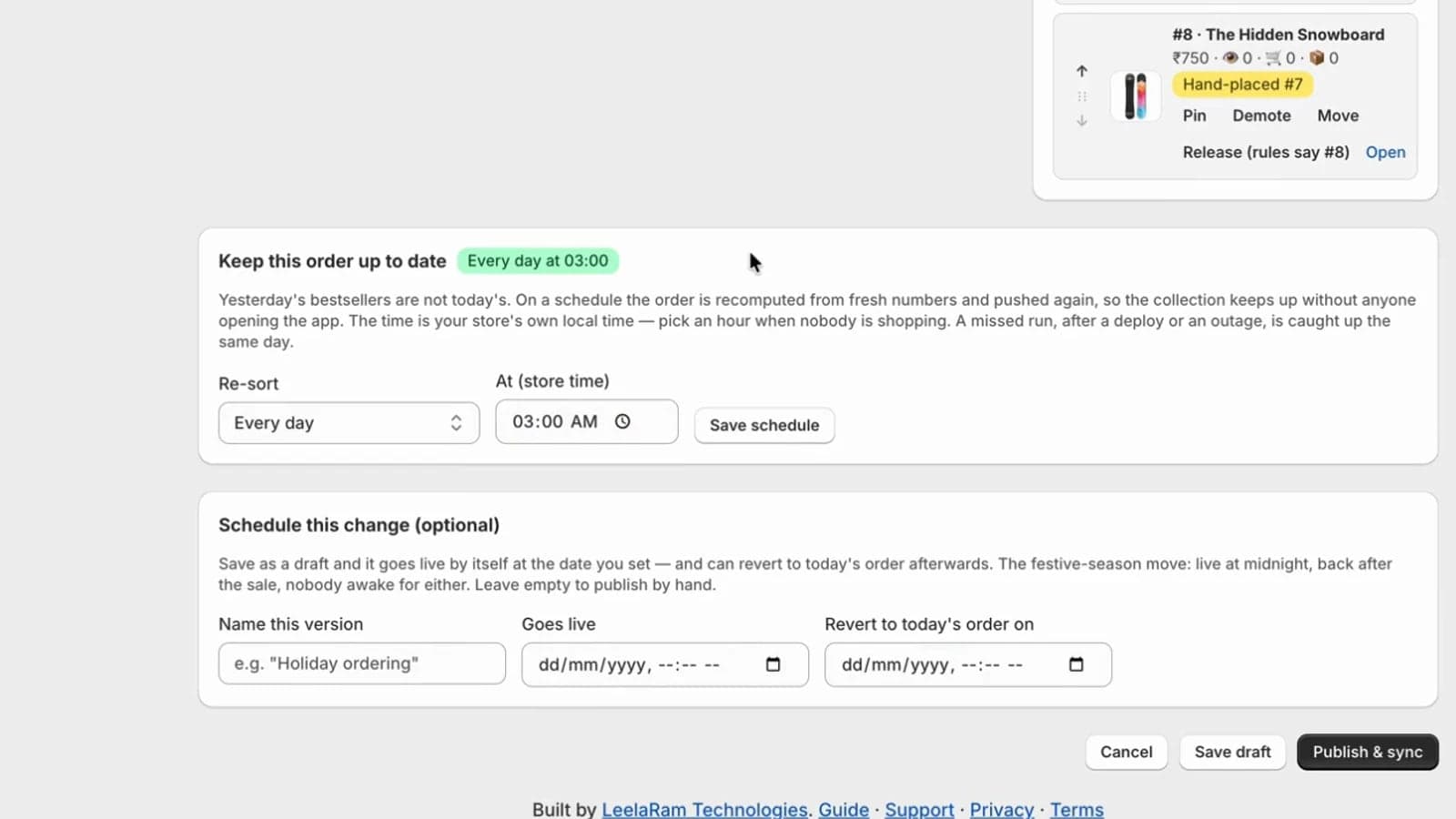
- Drafts, scheduled publishes and automatic revert for campaigns
- Daily or weekly re-sorts, in your store's own time zone
- Per-version performance attribution so merchants can prove what worked
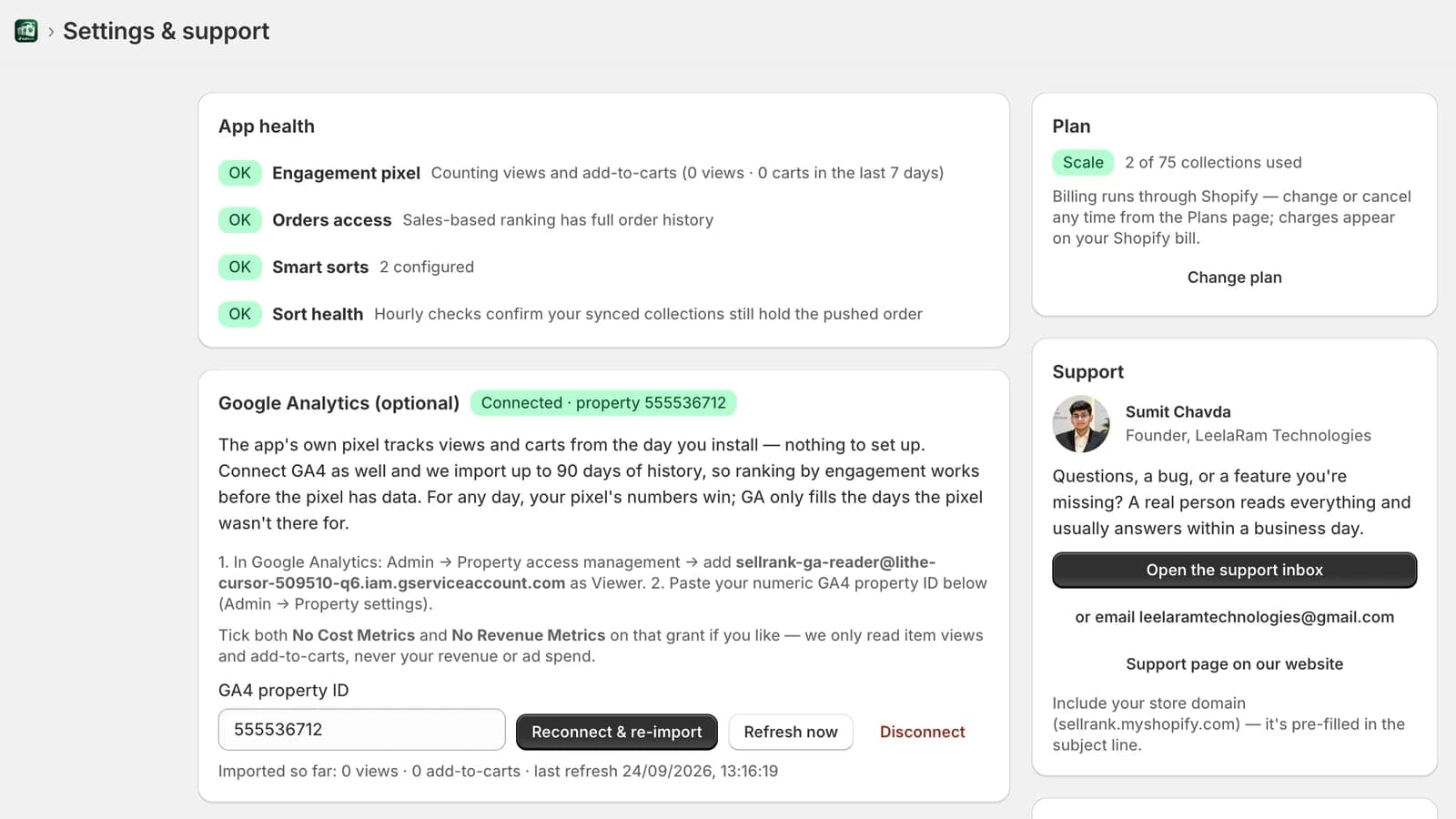
- Sort-health monitoring that flags any order drifting on Shopify
The whole app, start to finish
A complete walkthrough on a real Shopify store: build a smart sort, rank it by what sells, preview the exact order, sync it into Shopify and keep it current, then connect Google Analytics and rank with its history. Jump straight to any chapter.
Recorded on a Shopify development store, so view and add-to-cart counts read zero. On a live store they fill in as shoppers browse.
Every screen, in the order you meet it
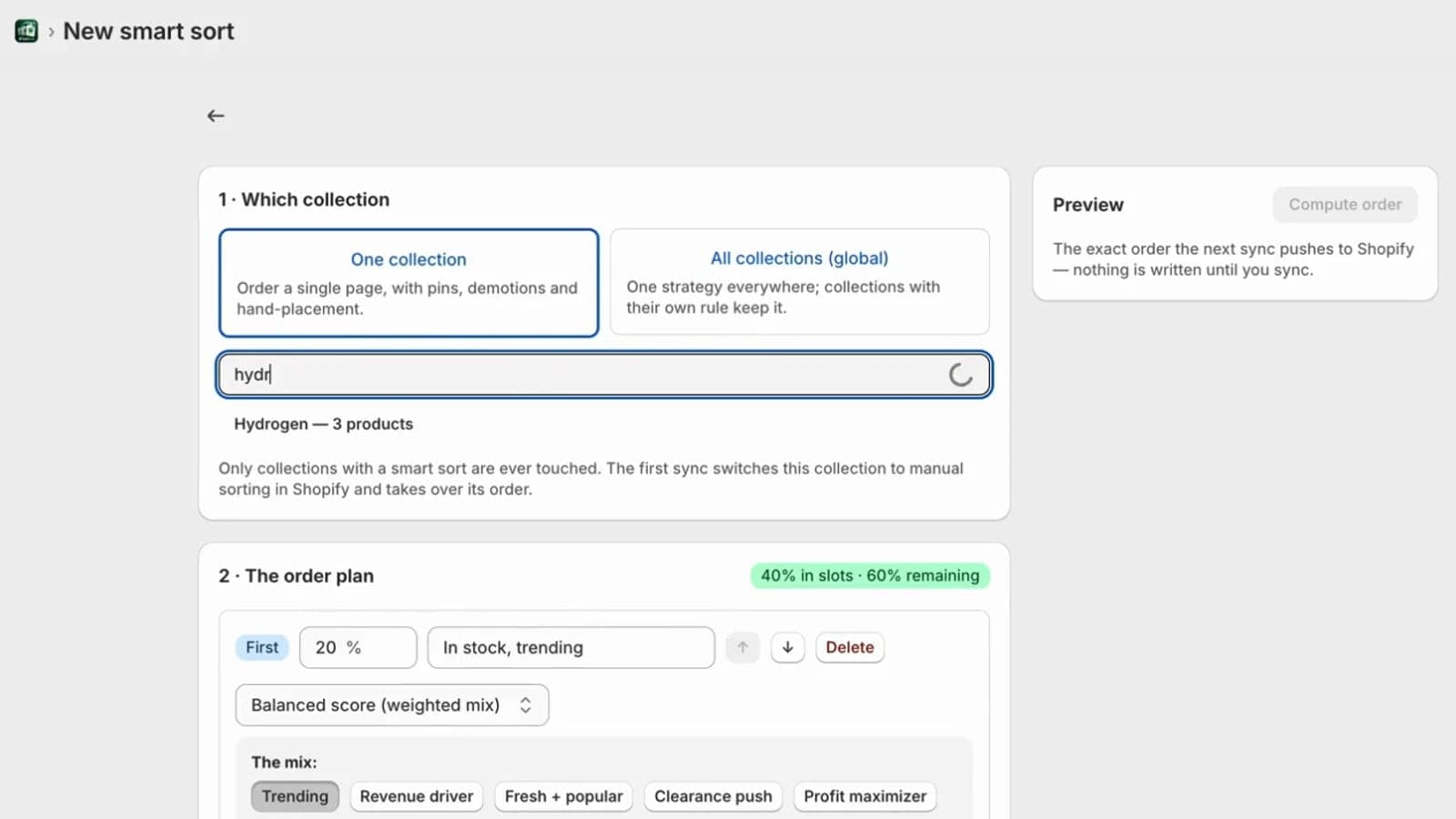
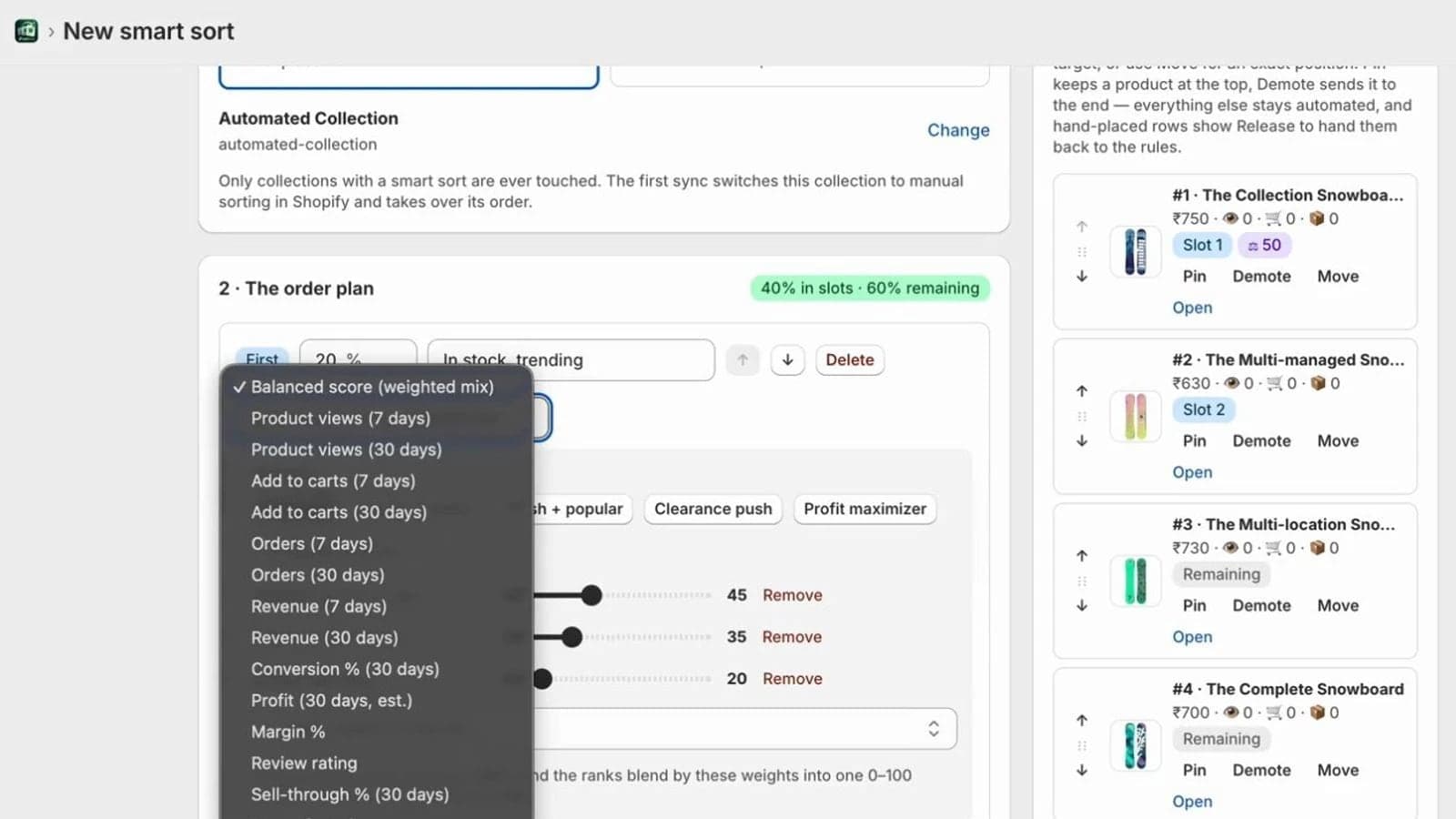
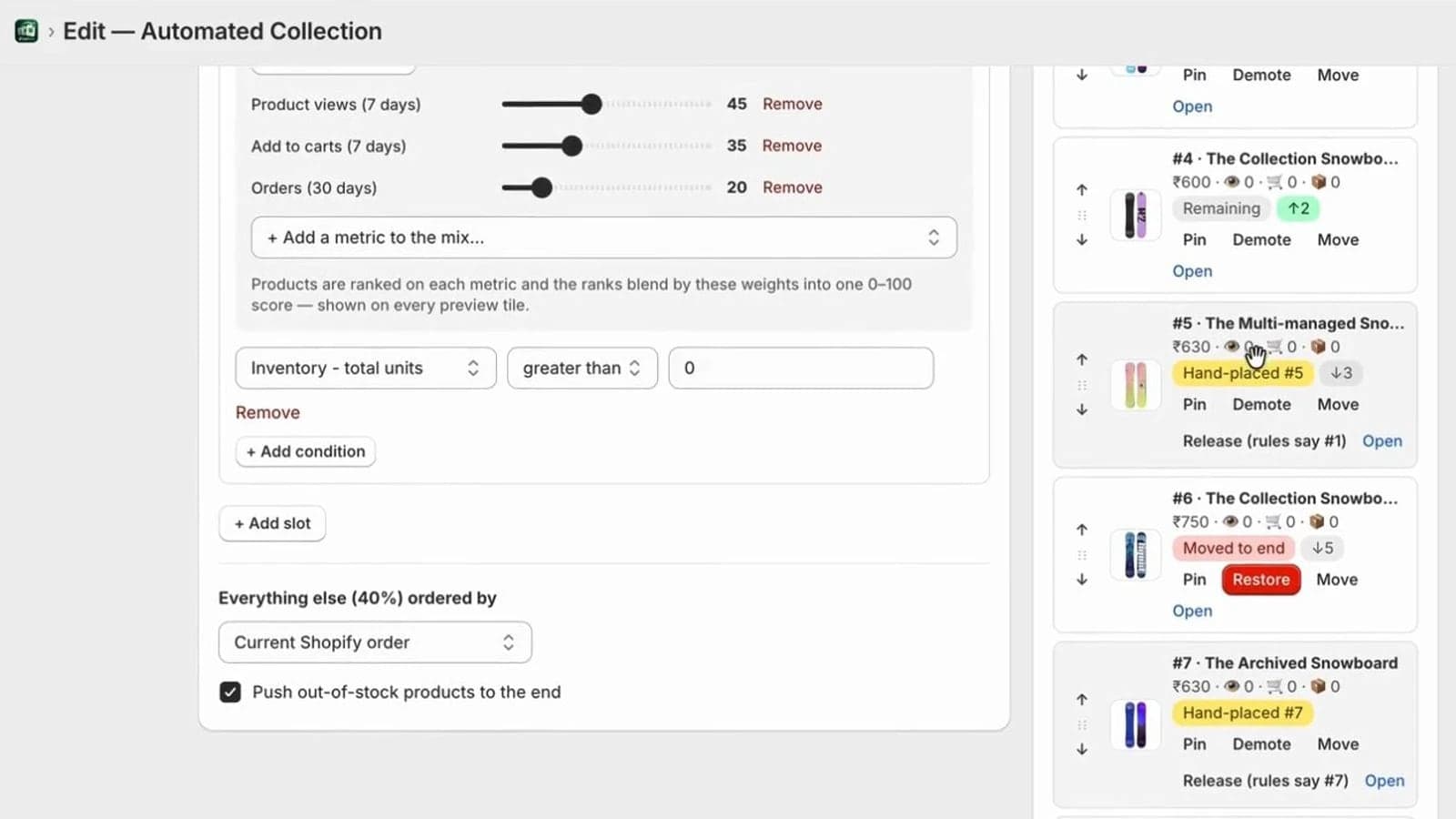
Real screens from SellRank, nothing mocked up. Click through them, or jump to that part of the walkthrough.
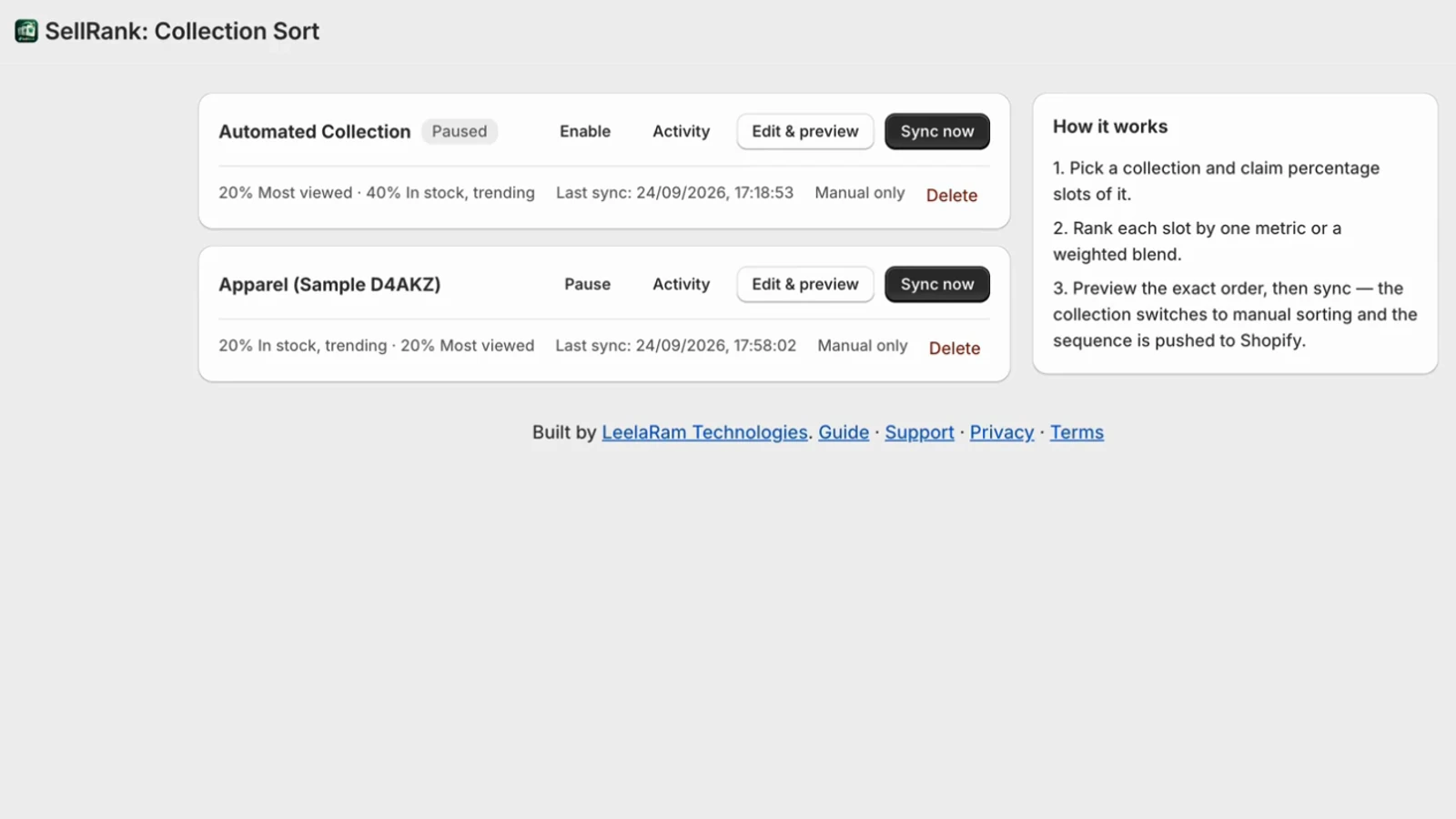 Full size
Pick a strategy. Watch the collection reorder.
This is the same ranking maths the app runs on your store, on a small sample catalogue. Revenue rewards the big-ticket ring; conversion rewards the studs that sell to almost everyone who looks; the Balanced score finds the middle without letting one runaway product flatten the rest.
In the app you add conditions — in stock, price range, tags — then pin, demote or drag anything by hand before you sync.
Balanced score blends views (40%), orders (35%) and revenue (25%) by rank, so one runaway product can't flatten the rest — the same maths the app uses.
Everything a merchandiser wished the sort button did
Percentage-slot composition
Describe a collection the way a merchandiser thinks: claim slices of it for different strategies, and let the rest follow one ranking. Slots fill top-down and pass their deficit on, so nothing is ever left empty.
Balanced score blend
Mix several metrics into one 0–100 score with weights — trending, revenue driver, profit maximizer, customer favourites — rank-normalised so one viral product can't flatten everyone else.
Built-in engagement pixel
Installs itself through Shopify's Web Pixels API the first time the app opens. Counts product views and add-to-carts per product per day — aggregates only, no customer data.
Profit-aware ranking (Scale and up)
Reads cost per item to rank by margin and estimated profit. Sell-through and days of stock cover work on every plan — clearance logic that never mistakes made-to-order items for overstock.
Human override, always
Pin a hero product, push one down, or drag any tile into place. A merchandiser's decision always beats the automatic order — and is remembered on every re-sync.
Drafts, schedules & versions
Stage a change, set it live at a date, have it revert automatically when the campaign ends. Every published order is kept as a version that can be restored in one click.
Per-version performance
Daily views, carts, orders and revenue are attributed to the version that was live — so a merchant sees, in numbers, whether the new order beat the old one.
Sort-health monitoring
An hourly check compares the live Shopify order with what was pushed. If a merchant, a theme or another app scrambles it, the collection is flagged, and one click re-syncs it.
Google Analytics backfill (Scale and up)
Connect a GA4 property and import up to 90 days of history so engagement-based ranking works before the pixel has data. The pixel stays the source of truth going forward, and keeps counting on every plan.
Daily and weekly re-sorts
Yesterday's bestsellers aren't today's. Set a smart sort to re-sort every day, or once a week on a chosen day, at an hour in your store's own time zone — and a run missed during an outage is caught up the same day.
Find any collection instantly
Search every collection in the store by name or handle — jewelry finds jewellery — or paste a collection link straight from Shopify admin. No scrolling through a list of hundreds.
A person answers
Ask from the Support page inside the app and the founder replies in the same thread. The home page flags a new answer, so nothing gets lost in an inbox.
Install, sort, and let it run
- 01
Install from the Shopify App Store
One click, one permissions screen. The engagement pixel provisions itself — nothing to paste into a theme.
- 02
Pick a collection and a strategy
Search the store or paste a collection link, then choose a single metric or compose percentage slots, add conditions like in-stock or price range, and watch the live preview update.
- 03
Preview, then sync
The exact resulting order is shown product by product with the reason for each placement. Sync switches the collection to manual sort and pushes the sequence to Shopify.
- 04
Let it run, and see the proof
It re-sorts daily or weekly on your schedule, publishes and reverts on the dates you set, attributes results to each version, and checks hourly that Shopify still holds the order.
Step by step, setting by setting: read the SellRank setup guide, or follow the 5 tutorials.
Learn SellRank step by step
5 short tutorials, from installing the app to profit ranking — each with screenshots from the app and the matching part of the walkthrough.
Against a typical sorting app
The norm across the collection-sorting apps we studied, feature by feature. No competitor is named — this is the shape of the market, not a scorecard.
Capability
Views & carts from a built-in pixel, no Google Analytics needed
- SellRank
- Included, from install day
- Typical sorting app
- Usually needs GA connected
Capability
Blend several metrics with separate time windows in one score
- SellRank
- Balanced score, per-metric windows
- Typical sorting app
- Single metric or one global window
Capability
Profit, margin, sell-through and stock cover on real units
- SellRank
- Included
- Typical sorting app
- Top tiers only, if at all
Capability
Per-version performance attribution
- SellRank
- Every published order measured
- Typical sorting app
- Not offered
Capability
Sort-health monitoring — alerts when Shopify's order drifts
- SellRank
- Hourly checks, one-click re-sync
- Typical sorting app
- Not offered
Capability
Drafts, scheduled go-live and automatic revert
- SellRank
- Included
- Typical sorting app
- Rare
Capability
Full editor and live preview on the free plan
- SellRank
- Yes — one collection, one live sync
- Typical sorting app
- Often reduced or time-limited
Capability
No theme code, no storefront JavaScript for sorting
- SellRank
- Writes to Shopify's native sort
- Typical sorting app
- Some inject scripts
| Capability | SellRank | Typical sorting app |
|---|---|---|
| Views & carts from a built-in pixel, no Google Analytics needed | Included, from install day | Usually needs GA connected |
| Blend several metrics with separate time windows in one score | Balanced score, per-metric windows | Single metric or one global window |
| Profit, margin, sell-through and stock cover on real units | Included | Top tiers only, if at all |
| Per-version performance attribution | Every published order measured | Not offered |
| Sort-health monitoring — alerts when Shopify's order drifts | Hourly checks, one-click re-sync | Not offered |
| Drafts, scheduled go-live and automatic revert | Included | Rare |
| Full editor and live preview on the free plan | Yes — one collection, one live sync | Often reduced or time-limited |
| No theme code, no storefront JavaScript for sorting | Writes to Shopify's native sort | Some inject scripts |
Plugs into what a store already runs
Review ratings are read from the standard product metafields these apps write — no separate integration to set up.
Shopify
Native collection sorting & Web Pixels
Google Analytics 4
Optional 90-day history import
Judge.me
Ratings via standard metafields
Loox
Ratings via standard metafields
Yotpo
Ratings via standard metafields
Stamped
Ratings via standard metafields
Okendo
Ratings via standard metafields
Simple plans, no surprise meters
Metered by collections — stated plainly, never retroactive. Every paid plan starts with a 7-day free trial, and paying yearly gets two months free. Billing through Shopify.
Free
$0 forever
A real taste of the product — full editor, live preview and curation on one collection, with one live sync.
- 1 collection
- Full editor & preview
- Pins, demotions, drag & drop
- 1 live sync
Grow
$29 per month
or $290/year — two months free
For stores getting serious about merchandising.
- 15 collections
- Unlimited live syncs
- Daily or weekly automatic re-sorts
- Drafts, scheduled publishes & auto-revert
- Version history
- Performance analytics & sort-health monitoring
Scale
$69 per month
or $690/year — two months free
Everything a growing catalogue needs, at App Store prices.
- 75 collections
- Everything in Grow
- Global rule for every collection
- GA4 backfill & profit metrics
- Drift alerts with one-click re-sync
Max
$249 per month
or $2,490/year — two months free
Unlimited, with priority support.
- Unlimited collections
- Everything in Scale
- Priority support
- Direct line to the founder for merchandising advice
Plans are chosen and billed inside Shopify
There's nothing to buy on this page. Install SellRank from the Shopify App Store, then pick a plan, start a trial, or switch plans on Shopify's own plan page in your Shopify admin. Charges appear on your Shopify invoice, in your store's currency.
Prices shown in USD; billed through Shopify in your store's currency. Plans and limits are confirmed on the App Store listing.
Version history
Every SellRank release, dated and in plain language — what changed, and for whom.
SellRank 1.3 — rate SellRank, and steadier scheduled work
You can now rate SellRank from inside the app through Shopify's own review window, and send us a suggestion from Settings. Behind the scenes, scheduled re-sorts, publishes and reverts do their work with far less overhead, and pixel counts are saved in batches without ever showing you a stale number.
- NewRate SellRank from Settings. It opens Shopify's own App Store review window, or SellRank's reviews page on the App Store when Shopify can't show the window just then.
- NewAfter your third successful sync, SellRank may ask once whether you'd like to leave a review, using Shopify's review window. Shopify decides when it can appear, it is asked rarely, and never again once you have reviewed.
- NewSend a suggestion from Settings: ideas and problems go straight to the support inbox, where a person reads every message.
- ImprovedProduct views and add-to-carts are saved in batches. Settings, the analytics and every sort save any waiting counts first, so the numbers you see are always up to date.
- ImprovedScheduled re-sorts, publishes and reverts run exactly as before, with far less background work between them. A scheduled step that fails, for example on a store that has uninstalled, now waits 30 minutes before trying again instead of retrying every minute.
Why a Shopify store needs a collection sort app
Shopify's built-in collection sorting offers best-selling, newest, price and alphabetical orders, or a manual order you maintain by hand. Best-selling is an all-time list, so a product that sold well long ago can hold the top slot while this month's demand sits on page three, and a manual order stops moving the day someone last edited it. Every sort option, and where each one breaks, is worth ten minutes if your collections still use the defaults — and the conversion case for collection order explains why it matters.
SellRank exists to replace that with an order driven by what is selling now. It was built first for a live jewellery store's collections, where every ranking decision could be checked against real sales, then rebuilt as a multi-tenant app for any Shopify store. Before a version ships it is verified against more than 78,000 sorting cases and a live-store audit — how we test it is written up in full.
It fits around what a store already runs. Sorting writes into Shopify's native manual order, so any theme renders it and no storefront script is added. Views and add-to-carts come from a first-party pixel installed through Shopify's Web Pixels API; a Google Analytics 4 property can optionally backfill up to 90 days of history; ratings are read from the standard metafields written by Judge.me, Loox, Yotpo, Stamped and Okendo. Sale periods get drafts, schedules and automatic revert, and profit-aware ranking needs only cost per item filled in.
Start with the free plan on one collection, follow the five-minute setup guide, and watch the changelog for what ships next. Questions go to the in-app Support tab or email, and reach the person who built it.
Questions about SellRank
Where do I install SellRank?+
From the Shopify App Store at apps.shopify.com/sellrank-collection-sort. Click Install, approve the permissions, and Shopify's own plan page opens: pick the Free plan or start a seven-day trial of a paid plan. Billing runs through Shopify, on your Shopify invoice.
Do I need to edit my theme or add any code?+
No. Sorting writes into Shopify's own manual collection order, which your theme already renders, and the engagement pixel installs itself through Shopify. Install, open, sort — that's the whole setup.
What happens to my collections if I uninstall?+
They keep the last order that was pushed and stay on manual sorting until you change them in Shopify admin. Nothing breaks, and no theme files were ever touched.
Where do views and add-to-cart numbers come from?+
From the app's own web pixel, which counts them per product per day as aggregates — no customer identifiers, ever. Optionally, a GA4 property can be connected to import up to 90 days of history.
How accurate is the sorting?+
Provably exact. Every ranking option is verified against known inputs, the move planner is tested on over 78,000 cases, and after each real sync the app confirms Shopify holds the computed order position by position.
Does profit sorting need anything from me?+
Only that cost per item is filled in on your products in Shopify. Where it isn't, profit and margin read zero rather than a guessed number — the label says 'est.' for exactly that reason.
Is there a free plan?+
Yes — one collection with the full editor, live preview and curation, plus one live sync to see it on your own store. The paid plans add more collections, automation, analytics and version history.
Can SellRank re-sort my collections automatically?+
Yes. Set a smart sort to re-sort every day, or once a week on a day you choose, at an hour in your store's own time zone. It recomputes the order from fresh numbers and pushes it to Shopify without anyone opening the app, and a run missed during an outage is caught up the same day. Scheduled re-sorts come with the Grow plan and up.
How is SellRank different from Shopify's built-in best-selling sort?+
Shopify's best-selling order is a single all-time ranking. SellRank ranks on the metric and time window you choose — revenue, orders, conversion, views, carts, profit, sell-through or a weighted blend — lets you compose percentage slots with conditions like in stock or price range, keeps your pins and demotions, and re-sorts on a schedule so the order stays current.
Does SellRank work with any Shopify theme?+
Yes. It writes into Shopify's own manual collection order, which every theme renders, and adds no storefront JavaScript for sorting. Theme files are never touched, so uninstalling changes nothing in your theme.
Will it slow down my storefront?+
No. The sort is applied server-side into Shopify's native order — nothing runs in the shopper's browser to reorder products. The engagement pixel is a Shopify web pixel that counts views and add-to-carts as aggregates.
Can I schedule a sale order and have it revert automatically?+
Yes. Stage the sale order as a draft, give it a go-live date, and add a revert date — it publishes itself on the date you set and the previous order returns when the sale ends. Every published order is kept as a version you can restore in one click. Drafts and scheduling are part of the Grow plan and above.
Merchandising, from the blog
Ready to sort by what actually sells?
Free to try on one collection. No code, no theme edits — install, preview, sync.
Or email leelaramtechnologies@gmail.com